|
| In the growing popularity of the web, it is very easy to get lost deep within the pages of any website. It's also important to make sure your data is being transferred securely, and you're browsing the site you should be. At PaylessCarRental.com, we have taken a few steps to help protect you and your information: |
|
 |
| Visual Navigation |
|
| As illustrated in the image below, we've incorporated a visual representation of where you are located in our site. It gives a general indication of how you've arrived in the site, and how to backtrack. |
|
|
|
Primary page: the first page in the root of the site |
|
|
Secondary page:a page off the root of the site. |
|
|
Tertiary page: a page under the customer service section. |
|
| If you ever get lost while browsing our site, you can click either number one to get you back to our home page. If the page you're viewing doesn't appear to have Visual Navigation, just click the logo at the very top of the page which will return you to our home page. |
|
|
|
| Secure Data Transmission |
|
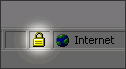
| While making a reservation, you will notice a small icon indicating the transfer to a secure site. |
|
| Seeing this icon means that any futher information transmitted (such as credit card information, address, phone number, etc) will be encrypted. This means that, if by chance your information is intercepted, it will be unreadable. |
|
|
|
| Phishing |
|
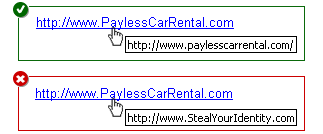
| Phishing is a term that describes a user being fooled into thinking they're at a different website than they realize. This generally happens when clicking a link from an email. An easy way to determine if you're being fooled is to first hover your mouse over the link in question. |
|
| If you've already clicked the link, just check in the address bar of your browser to see if the URL matches that of the site you want to be at. If it doesn't, you've probably click a link that is trying to "phish" you into giving up your personal information. |
|
|
| |
|
|